 Support for eserp 1.5 has been discontinued as of 01.01.2024, the online help will no longer be updated
 Escalation events
Settings | Service | Service management | References | Escalation events
The escalation events describe the reaction to step by step increments of an escalation point. Who will be notified and how they will be notified is also specified here.
Also see Escalation points
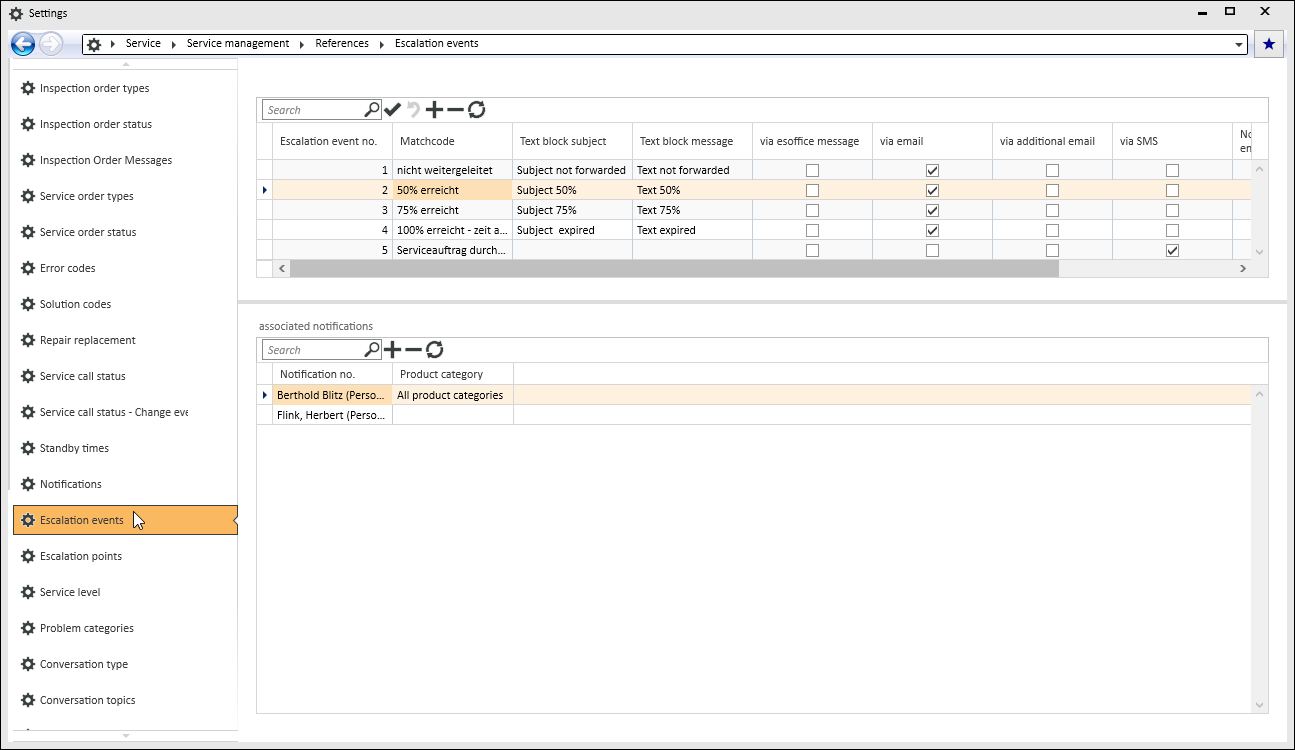
'Escalation events' table
Escalation event no.
Assign a unique number for each escalation event.
Matchcode
Enter a meaningful description of each event here.
Subject text module
Select a text module that will be used as the Email subject line for the escalation notification.
Message text block
You can select a text module to be used as the escalation event notification here. This text module is used for sending the notification as an Email, additional Email, SMS, and esMessage.
By esMessage
If this option is activated, a notification is also given by esMessage. If an escalation occurs, the corresponding employees will receive an internal esMessage with the event text.
By Email
If this option is activated, the service call escalation notification is sent by Email message. The 'Email' (from the associated notifications) is used to send the Email.
By additional Email
If this option is activated, the service call escalation notification is sent to an additional Email address by Email message. The Additional Email address (from the associated notifications) is used to send the Email.
BY SMS
If this option is activated, the service call escalation notification is sent as an SMS. The Message text module is used for this. The Telephone number SMS (from the associated notifications) is used to send the SMS.
Notify responsible employee
Activate this option if the employee entered in the service call as Responsible is to be notified in the event of an escalation.
Also see the Responsibility area under Approval.
Notify responsible employee according to forwarding
Activate this option if the person entered in the service call as the Responsible employee is to be notified by forwarding.
Also see the Responsibility area under Approval.
'Associated notifications' table
Entries from the 'Notifications' reference table are assigned to an escalation event here. Several addresses can be assigned to an escalation event here. If there are no associated notifications for an escalation event, the assigned addresses for the service call will be used for the notification.
Notification no.
Select a Notification from the Notifications reference table.
Product category
If a notification for an escalation event is only to be made for certain product categories, select the corresponding product category here. In this way, you can create separate notifications for each product category.
Leave the Product category field empty if the assigned notification is always to be made, i.e. also if no product category is assigned. Select All product categories if all the associated categories are to be considered.