 Support for eserp 1.5 has been discontinued as of 01.01.2024, the online help will no longer be updated
 Contract fee types
Settings | Service | Contract management | References | Contract fee types
The contract fee type essentially specifies how often a contact invoice is due.
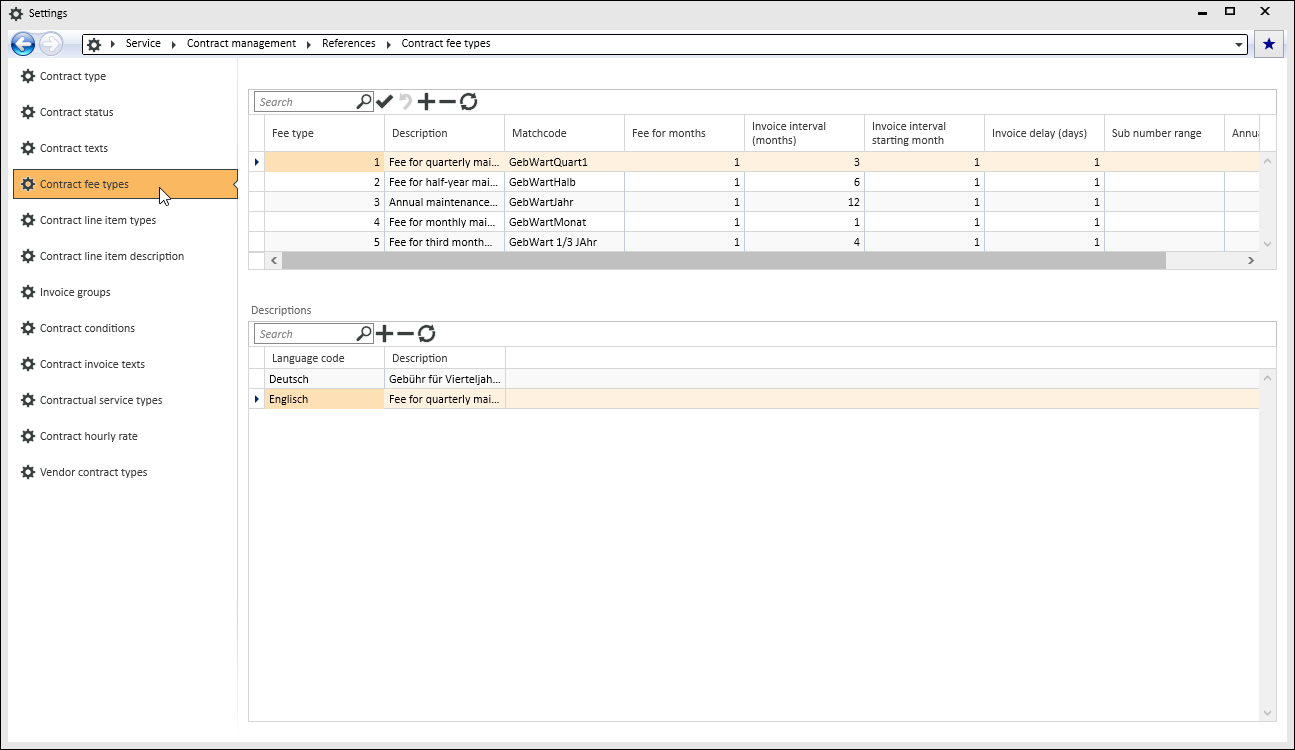
The contract fee type specifies the start month for periodic invoices, for example: January, February, and so on. It also specifies the invoice period, for example that an invoice is issued every month, or quarterly, or every six months, etc.
The fee type also specifies the number of months for which the fee for the contract line items is valid.
You can also specify the invoice delay in days for a fee type. A fee type can also be made for the sub code for the invoices number range.
'Contract fee types' table
Fee type
Assign a unique number to each fee type.
If Descriptions are recorded in several languages, the combination of the Contract fee type number and Language code must be uniquely assigned.
Description
The Description for the contract fee type is recorded in the Descriptions table together with a language code and is only displayed in this field.
Matchcode
Enter a search term for the contract fee type in this field.
Fee for months
Enter the number of months for which this contract fee type is intended in the Fee for months field.
It is best to break the fee down to one month. Nevertheless, in practice it may be that you wish to charge a client a fee that is a round number, for example: 200 € for a three month period. If this fee is broken down to a monthly fee, the amount is a repeating decimal, which is a problem. For this reason, the fee period can be specified. The system automatically breaks this down when the contract is charged.
Invoice interval (months)
In this field, enter a time period in months for the interval between invoices.
Invoice interval start month
Enter the month that is the start of the charging period.
Invoice delay in days
Enter the number of days to be added to the due date for the invoice in the Invoice delay in days field. The specified number of days is added to the invoice due date, so that, for example, an invoice due on January 1 will not be invoiced until January 15 because you want to present the bill to the client in the middle of the month.
Sub number range
In this field you can enter the invoice number that is to be used for creating contract invoices. This information can be used, for example, if you want a separation into different number sub ranges for contract invoices for systems that are operated by different departments in a company. If a number range sub code is entered, the system will attempt to use the specified sub code number range for both the outgoing invoice book (number range code REC) and the contract invoice (number range code VRC). If this does not exist, number range sub code 1 will be taken in each case.
An entry in this field disables number range processing according to the department of the logged in user. The sub code (see Sub number ranges) is normally referred to the department of the employee (also see Departments).
The number range sub code is used on an invoice by invoice basis for contract invoices. This means that contract invoices can be printed out inter-departmentally, for example, by Book keeping.
Annual increase (percent)
Enter the percentage rate here that has been agreed for the annual increase in the contract fees for this fee type.
'Descriptions' table
Record a description of the selected contract fee type in the selected language in this table.
Language code
Select a Language code from the Languages reference table. The Language code refers to the language that is used for the entries in the Description field.
Multi-language capability for the program requires the license 0110340 Multi-language labels.
Description
Enter a Description according to the set Language code.